Brand and non-brand, split
See clicks, impressions, position and CTR for brand queries and generic queries side by side, and how much traffic depends on people already knowing you.
Seven views built on top of GSC. Deep Insights flags cannibalization, CTR gaps and position drops, ClusterIQ shows which pages own which topics, and Crawl Pulse keeps an eye on coverage.
 yourbrand.comAll countries
Sample data for illustration
Search Console gives you rows. SearchMind sorts them around the questions you'd ask anyway, like how much traffic comes from people who already know your name, or which page really owns a topic.
See clicks, impressions, position and CTR for brand queries and generic queries side by side, and how much traffic depends on people already knowing you.
ClusterIQ groups the queries each URL earns impressions for and tags their intent, so you can see which page owns which topic.
Crawl Pulse tracks crawl stats and indexing in the same hub, and alerts you when the number of indexed pages drops.
Deep Insights reads your GSC query and page data and sorts it into tiles. Click one to get the affected queries and pages in priority order, instead of hunting for them in a table.
The same query ranks on more than one of your URLs. The pages split impressions and signals, and usually neither ranks as well as one merged page would.
2 URLs · 8.1K impressions
2 URLs · 5.3K impressions
2 URLs · 1.6K impressions
2 URLs · 2.9K impressions
A strong position with below-benchmark CTR. Google already shows the page; the title and description aren't earning the click.
pos 2.8
pos 3.4
pos 2.1
pos 4.0
Average position got worse than in the previous period. You see the slide here before it turns into lost clicks.
“what is a crm”
“lead scoring model”
“switch crm”
“crm reporting”
Queries sitting between positions 4 and 20. They already have impressions, and a content update or a few internal links can move them onto page one.
/blog/real-estate-crm
/blog/crm-data-hygiene
/blog/nonprofit-crm
/blog/crm-vs-excel
Organic Overview, Brand vs Generic, Keyword Analysis, Page Rankings, ClusterIQ, Deep Insights and Crawl Pulse. Each tab has one job, and none of them is the Search Console report with a new coat of paint.
Total pages, clicks, impressions and average position for the property, then move to the tab that fits your goal.
A searchable country filter and a GSC property dropdown apply to every tab.
Switch between the properties you've verified without leaving the workspace.
Connect GSC in Settings, select your property and, if you like, a country filter.
See total pages, clicks, impressions and average position for the property, then open whichever tab fits what you're working on.
Each tile is a to-do list. Click one for the affected queries and pages, already sorted by priority.
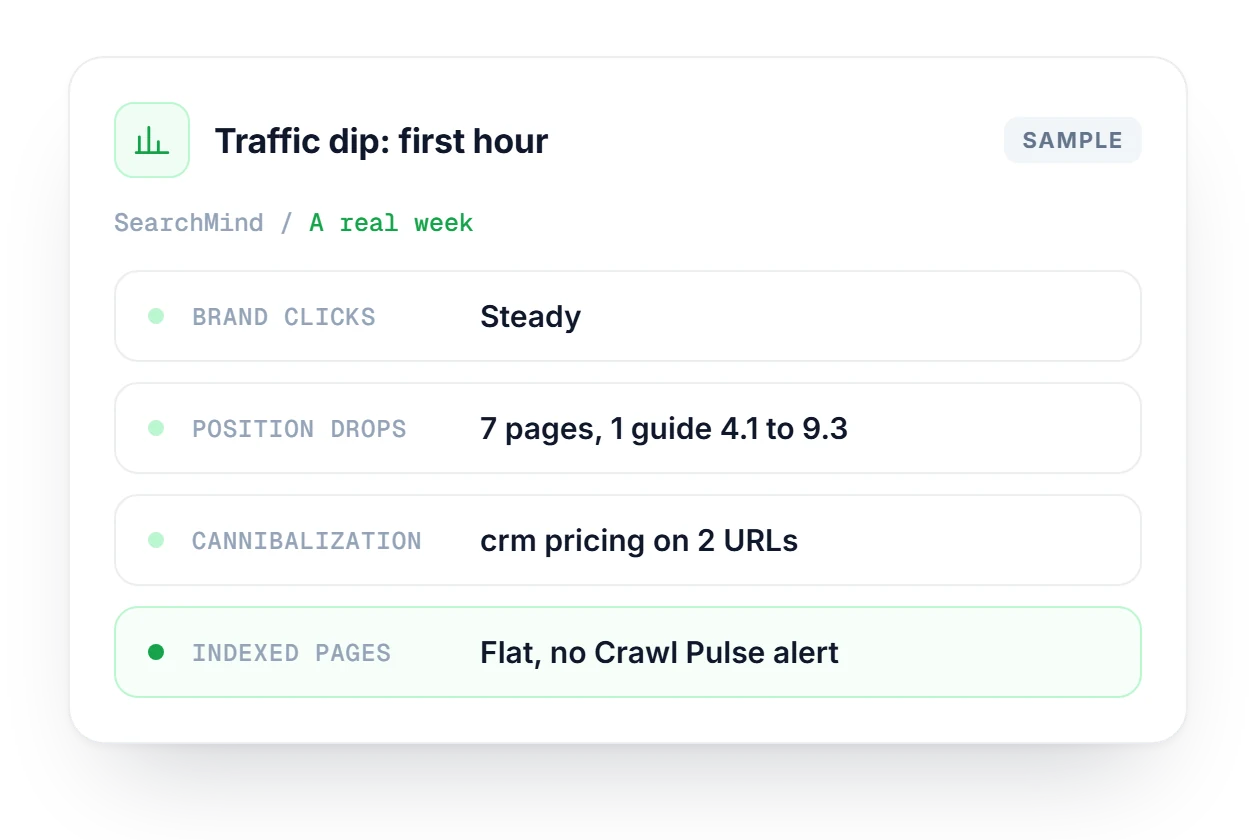
Organic clicks are down and nobody knows why. Brand vs Generic shows brand clicks held steady, so you open Deep Insights, where the Position drops and Cannibalization tiles point to a guide that slid and two URLs competing for one query. Crawl Pulse shows indexed pages flat, so you have a short list to work on.
See how your keywords spread across position buckets, then work the Quick Wins, CTR Gap and AIO Missing segments.
Explore Keyword DistributionTrack the keywords you care about by country, with position history and the landing page that ranks.
Explore Keyword RankingsFollow organic visitors past the click with a GA4 dashboard for sessions and engagement.
Explore BehaviorMindHow SearchMind turns Search Console data into views you can act on.
See which plan fits your sites and team.
Compare plans →It uses the same data but does the analysis for you. SearchMind organizes your GSC data into 7 views, and cannibalization, CTR gaps and page clusters are already identified when you open them, so you spend less time exporting and filtering.
ClusterIQ groups your GSC queries by landing page. It shows which pages own which topic clusters and tags each query with a heuristic intent label, so you get a topic authority map built from Search Console data.
From GSC query and page data. Cannibalization is the same query ranking on multiple URLs. A CTR gap is a strong position with below-benchmark CTR. A position drop is an average position that worsened versus the previous period.
It splits brand queries from non-brand queries and compares clicks, impressions, position and CTR for each, so you can see how much of your organic traffic depends on people already knowing your name.
Crawl Pulse is coverage monitoring inside the same hub. It tracks crawl stats, helps you spot indexing issues and alerts you when the number of indexed pages drops, which is often the first sign that something on the site broke.
Expect 48–72 hours. Google processes Search Console data with that delay, and SearchMind syncs as often as Google allows. Numbers for the last two or three days can still change, so compare periods that end a few days back.
Yes. A searchable country dropdown filters every tab to a single country, and All Countries is the default. Pick a market once and the overview, Deep Insights and every other tab show that market's data.
Start free with no credit card. Connect your site in a couple of minutes and open Deep Insights on your own data.
 Organic sessions