AI visitors, separated out
We read session source and medium in GA4 and group visits from ChatGPT, Claude, Gemini, Perplexity, Copilot and other AI platforms into one daily trend.
BehaviorMind splits your connected GA4 property into five ready-made sections: Growth, Behavior, Revenue, Acquisition Sources and User Intent. A separate AI referrer view shows who arrived from ChatGPT, Claude, Gemini, Perplexity and Copilot.
 yourbrand.com · Web
 412
412
 188
188
 96
96
 74
41
74
41
Sample data for illustration
AI referrers tracked in the Growth section
ChatGPT
Claude
Gemini
Perplexity
Copilot & other AI
Skip the Explore reports and custom dimensions. Connect a property and get the views you would have built yourself, plus one that GA4 doesn't give you out of the box.
We read session source and medium in GA4 and group visits from ChatGPT, Claude, Gemini, Perplexity, Copilot and other AI platforms into one daily trend.
Growth, Behavior, Revenue, Acquisition Sources and User Intent are ready as soon as you pick a property. Nothing to configure or maintain.
Presets run from Today to Last 90 days, plus Month to date, Last month and Custom. "Last N days" means full days through yesterday, same as GA4.
Each section answers one kind of question. Switch between them without losing your property or date range.
Total, new and returning users, active users and sessions by day, your top channels, and the daily trend of visitors sent by AI platforms.
Which pages people read, how engaged they are, and where they drop out of the funnel.
| Page | Views | Eng. |
|---|---|---|
| / | 21.4k | 62% |
| /pricing | 9.8k | 48% |
| /blog/ga4… | 7.1k | 74% |
| /features | 5.3k | 57% |
The GA4 monetization view: purchases, key events and conversion metrics, so e-commerce teams see sales next to traffic.
Where your visitors are, by country, and who is on the site right now with the realtime view.
Engagement and stickiness: whether people come back and how much of each visit they actually use.
GA4 and Search Console are different Google products with different permissions, so each gets its own OAuth connection. Connect them independently in Settings.
BehaviorMind reads your GA4 data. It does not change your property.
Once connected, choose the GA4 property from a dropdown. Manage it any time in Settings.
Analytics Data API and Analytics Admin API in your Google Cloud project. The Settings flow walks you through it.

Grant read-only Analytics access, separate from Search Console, with the Analytics Data API and Admin API enabled in your GCP project.
Pick your GA4 property from the dropdown, then a date preset or a custom range.
Growth for traffic and AI referrers, Behavior for engagement, Revenue for conversions. Switch to the AI Intelligence tab for the copilot.
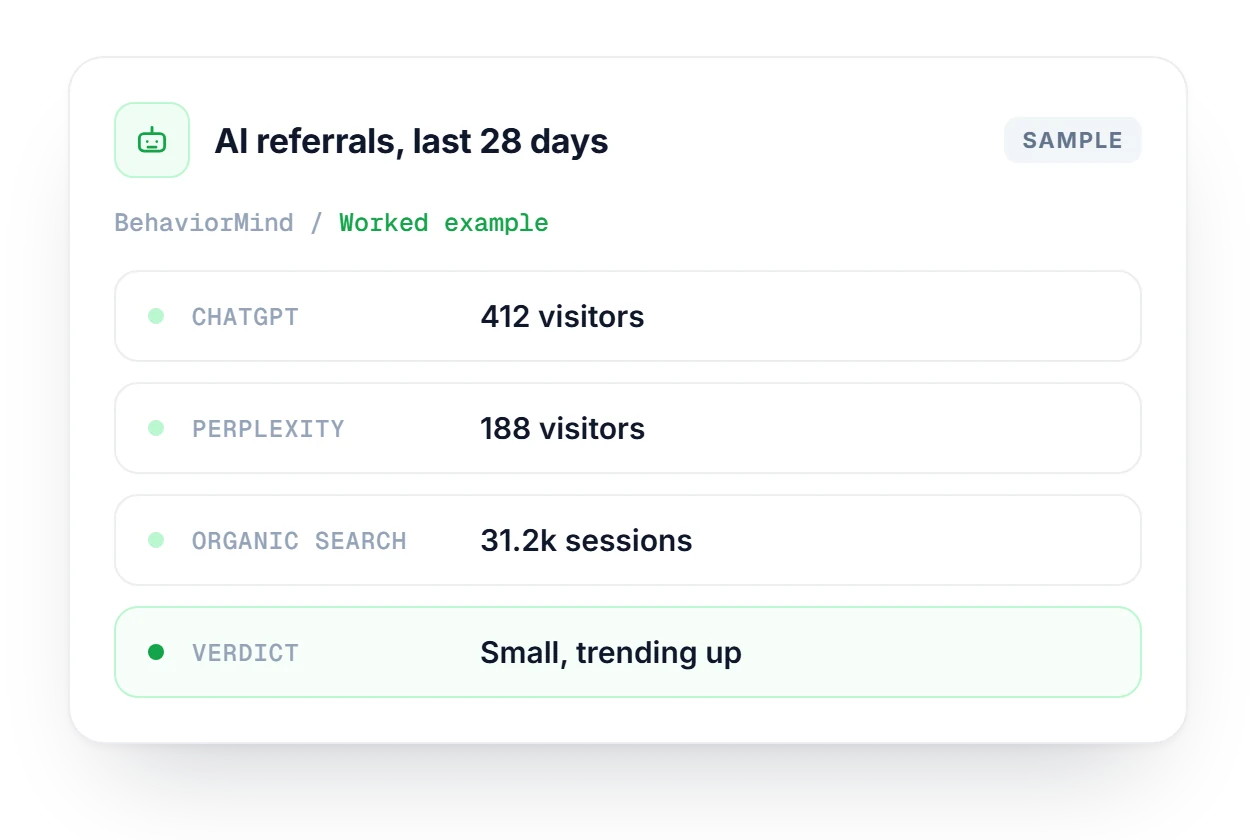
Someone in leadership asks whether AI assistants send any visitors, and GA4 doesn't answer that on its own. In BehaviorMind, set Last 28 days and open Growth, which splits visitors from ChatGPT, Perplexity, Gemini, Claude and Copilot. A few hundred AI visits against thirty thousand organic sessions is small, but a daily trend that keeps climbing is worth reporting.
13 AI modules and an analytics copilot on the same GA4 property and date range. Ask a question, get an answer grounded in your data.
Explore BehaviorMind AskNeed a custom layout or blended data? Embed the Looker Studio reports you already built, right next to BehaviorMind.
Explore Looker StudioAI referrals show who clicked. AI Tracking shows how often ChatGPT, Claude, Gemini and Perplexity mention you in the first place.
Explore AI TrackingConnecting GA4, how AI referrers are detected, and how BehaviorMind compares with Looker Studio.
Compare plans and see what else is included in TrafficMind.
Compare plans →Yes, GA4 has its own OAuth connection. Search Console and GA4 are different Google products with different permissions, so each one is connected and managed separately in Settings. The GA4 connection is read-only and never changes your property.
BehaviorMind reads the session source and medium in GA4 and picks out visitors referred by ChatGPT, Claude, Gemini, Perplexity, Copilot and other AI platforms. Those visits show up as one daily trend chart in the Growth section.
The presets are Today, Yesterday, Last 7, 14, 28 or 90 days, Month to date, Last month and Custom. The Last N days presets count full calendar days through yesterday, which is the GA4 default. A custom range can include today.
BehaviorMind is a ready-made view of your GA4 data inside Linkstonic, with fixed sections and nothing to build. Looker Studio is for custom layouts and blended data, and you can embed the reports you already built right next to BehaviorMind.
You need the Analytics Data API and the Analytics Admin API enabled in the Google Cloud project behind your OAuth setup. The connection flow in Settings walks you through both, so you don't have to dig around the Cloud console on your own.
Start free with no credit card. Connect your GA4 property in a few minutes and browse all five sections, AI referrers included.