13 modules that run on their own
Insight Engine, anomaly signals, Opportunity Finder, channel and audience intelligence, content performance and more, all computed from your GA4 window.
BehaviorMind Ask runs 13 AI analytics modules on your GA4 window and adds a copilot you can question in plain English, from channels and pages to AI traffic and revenue.
 Analytics Copilotyourbrand.com · Last 28 days
 ChatGPT412
 Perplexity188
 Gemini96
Sample conversation for illustration
The Dashboard shows raw GA4 charts. Ask interprets them for you, then lets you follow up in your own words.
Insight Engine, anomaly signals, Opportunity Finder, channel and audience intelligence, content performance and more, all computed from your GA4 window.
Open the floating chat from anywhere in the AI tab. Type a question and send it with Ctrl+Enter. Answers use your connected property and date range.
Content performance AI sorts every page: stars to promote, leaks with traffic but weak conversion to fix, and balanced pages to leave alone.
Quick asks cover the analysis most teams repeat. Click one, or type your own question in the copilot.
Start here when someone asks "how did we do?" and you need a short answer you can back up.
Users up 9% with steady engagement. Organic drove most of the growth; paid social slipped.
Against the previous 28 days: sessions +7%, key events +4%, bounce rate flat.
Fix the pricing page leak, refresh two decaying blog posts, test a shorter sign-up form.
See which channels earn their share, and how much traffic AI assistants send you now.
Organic 52%, Direct 27%, Referral 13%. Referral has the highest engagement per session.
New users mostly land on blog posts from organic search. Few reach pricing in the same session.
ChatGPT is the largest AI source, followed by Perplexity. Both are trending up week over week.
Who shows up, on what, and which pages hold their attention.
The homepage leads on views; the GA4 guide leads on engagement time.
Mobile is 61% of sessions but converts at about half the desktop rate.
The US and India account for most users. The UK has the best engagement rate.
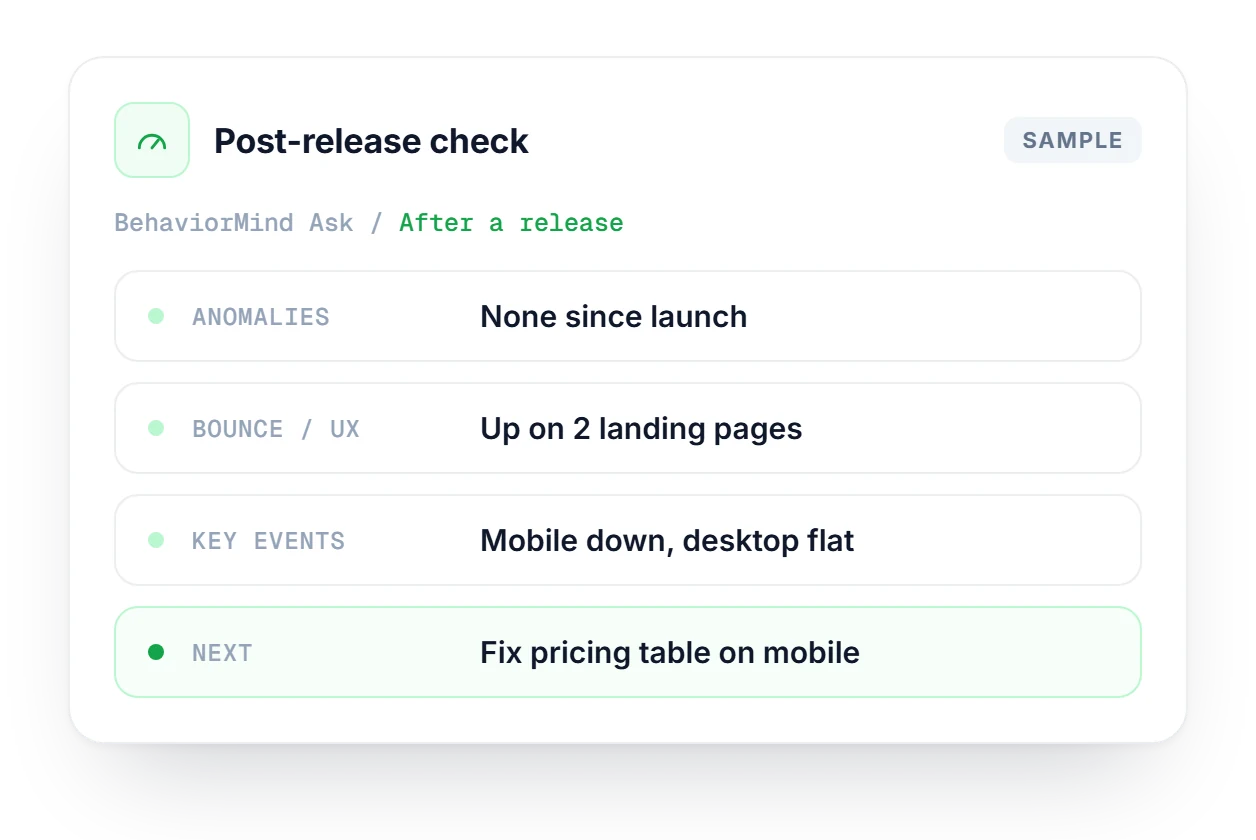
The checks worth running before a standup or a release: conversions, UX friction and anything unusual.
Sign-ups are up; demo requests are flat. Check the demo form on mobile.
Bounce rose on two landing pages after last week's layout change.
One sharp drop in sessions on the 14th, with no matching change in other channels.
The GA4 property and date range you set in the Dashboard tab carry over automatically, so both views always describe the same period.
Traffic score, Engagement score and Conversion proxy, each 0–100, computed from your GA4 window.
No re-selecting properties or dates when you switch tabs.
Use the scores to spot relative health, not as numbers to report on their own.
yourbrand.comLast 28 days ↻ syncedWith an OpenAI API key configured, the copilot writes longer answers with more context. Without one, a rules-based fallback still answers from your data.
When an OpenAI API key is configured on the server, the copilot writes fuller answers and handles open-ended follow-ups.
No API key? The copilot still works. It answers from your GA4 metrics with structured, rules-based responses, so nothing is blocked.
It uses the same connection as the BehaviorMind Dashboard. Switch to the AI Intelligence tab from there.
Insight Engine, anomaly signals, content performance and opportunities run automatically on your selected range.
Click the AI button to open Analytics Copilot. Type a question or pick a quick ask.
A redesign went live yesterday and the team wants to know if anything broke. Run the Health quick asks for Anomalies, Bounce / UX and Key events, then ask the copilot why conversions dipped on mobile. Here, bounce is up on two landing pages. Confirm the raw GA4 numbers on the Dashboard before anyone suggests rolling back the release.
The raw GA4 charts behind every answer: five sections, including AI referrer tracking, on the same property and range.
Explore the dashboardGA4 tells you what visitors did. SearchMind shows the search side: CTR gaps, cannibalization and page clusters from Search Console.
Explore SearchMindThe copilot reports AI referral clicks. AI Tracking shows how often AI assistants mention your brand in their answers.
Explore AI TrackingAPI keys, accuracy, and how Ask relates to the Dashboard.
See which plan includes BehaviorMind Ask and the rest of TrafficMind.
Compare plans →No. When no API key is configured, a rules-based fallback answers from your GA4 metrics and all 12 quick asks still work. Adding an OpenAI key on the server gets you fuller written answers and better handling of open-ended follow-ups.
The Dashboard shows the raw GA4 charts and metrics. Ask runs 13 AI modules that interpret those metrics, then adds the copilot for freeform questions. Use the Dashboard when you need the numbers and Ask when you need to explain them.
Yes. The GA4 property and date range you set in the Dashboard tab carry over to Ask automatically, so both views describe the same period. You never pick the property or the dates twice.
They are directional, not precise. The 0–100 scores are heuristics computed from your GA4 window, good for seeing whether traffic, engagement or conversions look healthy relative to each other. Report the underlying GA4 metrics instead of the scores.
Check the feature coverage map inside the product. It shows Live, Partial or Roadmap status for each of the 13 modules and is updated as features ship, so it's the place to look before you rely on a module in a report.
Yes. AI traffic is one of the 12 quick asks. You can also type your own question, for example asking for ChatGPT traffic over the last 28 days, and the copilot answers from the AI referrer data in your GA4 property.
Start free with no credit card. Connect your GA4 property and ask your first question in minutes.

