Synced with Search Console
One click pulls fresh positions from GSC for every tracked keyword at once. The numbers come from your property.
Track your money keywords country by country, synced with Google Search Console. See each position history against a top-10 line, plus the landing page that ranks for every term.
 Sync with Search ConsoleAuto-Check All
| Keyword | Market | Pos | Δ | Landing page |
|---|---|---|---|---|
| best crm for startups | US | 3 | ▲2 | /blog/best-crm |
| crm pricing | UK | 6 | ▲4 | /pricing |
| crm for real estate | IN | 14 | ▼3 | /blog/real-estate-crm |
Sample data for illustration
Keyword Rankings syncs with Google Search Console, so the positions you track come from your own verified property, split by the markets you sell in.
One click pulls fresh positions from GSC for every tracked keyword at once. The numbers come from your property.
Track US, IN, UK, CA, AU, DE, FR and JP. Add a keyword once for each country and follow every market separately.
Use Set Position (1–100) when an automated check comes back empty, or to bring in your old ranking records.
Four tools handle the tracking loop, from the first check to the long-term trend line.
Expand “Show position history” on any keyword to see its trend since the day you started tracking. Lower is better, and every chart has a top-10 reference line.
When your URL shows up in the results for a keyword, it's saved next to the position, so you can see which page ranks for each term.
Re-check every tracked keyword in one go. New keywords get checked automatically when you add them; refresh after 10–15 seconds to see the result.
Use Set Position to enter any value from 1 to 100. It covers keywords that automated checks can't reach and lets you import historical position data.
Keyword Rankings follows your classic Google positions. Track Keywords follows brand mentions inside AI answers. Those are different measurements, so Linkstonic keeps them in separate places.
Keyword RankingsClassic Google organic positions.
Brand mentions in AI engine answers.
Money keywords, SEO by market and showing that a content update paid off.
Track rankingsFinding out whether AI assistants recommend your brand.
See Track KeywordsConnect GSC in Settings with OAuth, or with a service account JSON key if you run an agency setup. That turns on bulk sync for your verified property.
Enter a keyword, your domain and a country, then click Track Keyword. The position check runs on its own; refresh in 10–15 seconds.
Click Sync with Search Console to update everything at once. Expand “Show position history” on a keyword to see its trend chart.
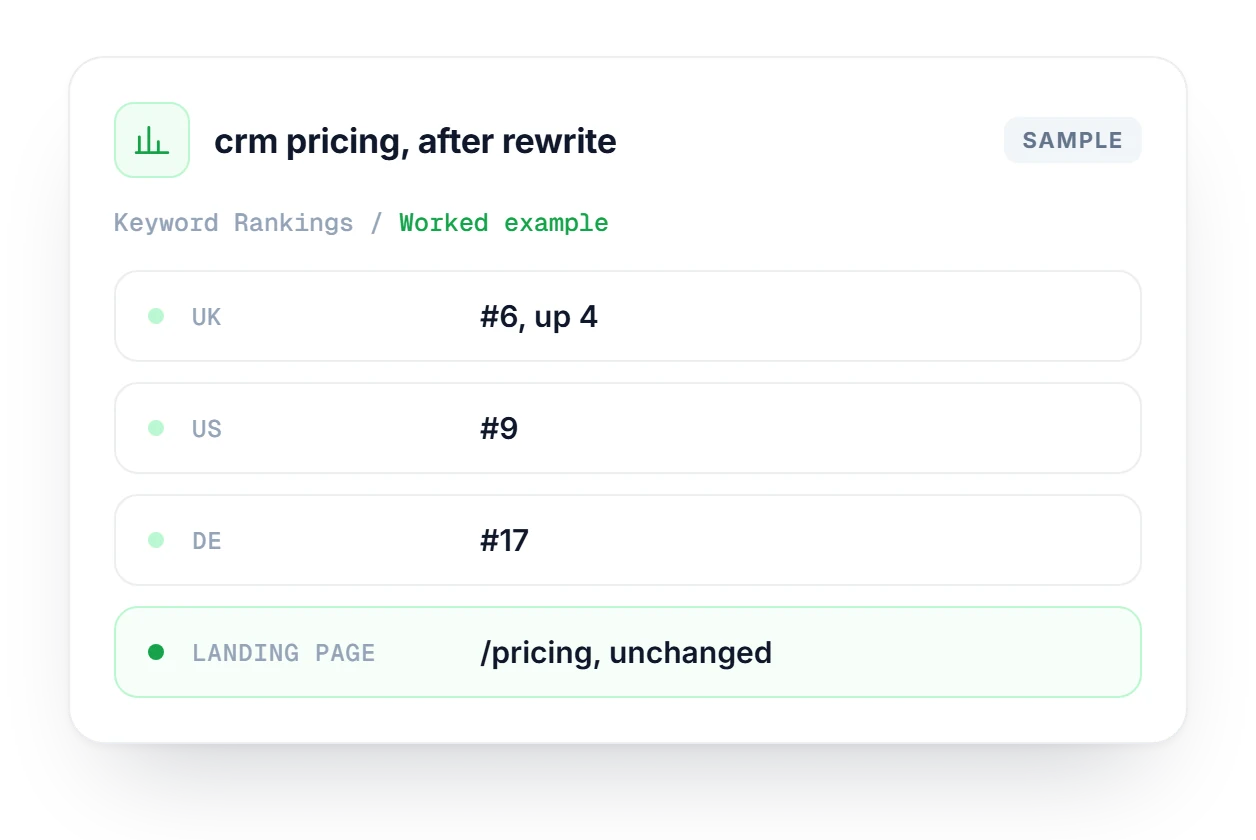
Your team rewrote the pricing page in March and sales wants to know if it helped. Sync Keyword Rankings with Search Console, wait for the data to catch up, then read each market separately. In the UK, "crm pricing" climbed 4 places to #6 with /pricing still ranking, while the US sits at 9 and Germany at 17.
Watch brand mentions across ChatGPT, Claude, Gemini and Perplexity, with visibility scores and share of voice.
Explore Track KeywordsTrack organic rankings and AI Overview citations side by side, and check whether Google's AI Overview cites your domain.
Explore SERP AI TrackerSee every GSC keyword by position bucket and go straight to the Quick Wins in positions 4–20.
Explore Keyword DistributionHow syncing, tracking and position history work.
See which plan fits the number of keywords and markets you track.
Compare plans →This module tracks classic Google organic positions from 1 to 100. Track Keywords monitors brand mentions inside AI engine responses such as ChatGPT and Perplexity. That is a completely different signal, so the two are tracked separately and you can use either one or both.
Because Google Search Console processes data with a 3–5 day lag. This is a GSC limitation, not a sync problem, and the UI shows a notice about it. Positions reflect what GSC has processed so far, not live rankings from today.
Yes. Add the same keyword more than once, choosing a different country each time, and each market gets its own position and history. Supported markets are US, IN, UK, CA, AU, DE, FR and JP.
Go to Settings → Search Console and follow the OAuth connection flow. Agencies that manage many properties can connect with a service account JSON key instead. Once connected, bulk sync is available for your verified property.
Whichever of your URLs appears in the search results for that keyword. It is recorded next to the position on each check, so you always know which page is ranking for each term and can spot when Google swaps one page for another.
Yes. Use Set Position (1–100) on any keyword. It is useful when an automated check returns no data, or when you want to import historical position records from a spreadsheet or another tool so your history chart starts earlier.
Start free, no credit card. Connect Search Console, add a keyword and see its first position within seconds.


