Every check in one pass
PageSpeed, on-page HTML, schema, redirects, hreflang and security headers run at the same time. You stop stitching five tools together to see one site.
Linkstonic runs 14+ automated checks on your site: PageSpeed and Core Web Vitals, schema, hreflang, security headers and E-E-A-T. Anything that fails or gets flagged comes with a fix, written by AI in plain language.
Sample report for illustration
Covered in every audit
A single run covers performance, markup, security and international setup, then tells your team what to change and why it's worth the time.
PageSpeed, on-page HTML, schema, redirects, hreflang and security headers run at the same time. You stop stitching five tools together to see one site.
Each warning and failure gets a plain-English explanation and the steps to fix it. Nobody has to go googling what a flag means.
Re-run after you deploy and check the score moved. Plans with extended history keep every run, so you have something to show your boss.
Each area gets its own score and a Pass, Warn or Fail on every check, with the measured value next to it.
Google PageSpeed Insights on mobile and desktop, Core Web Vitals, and performance sampled across multiple pages of the site.
Google PageSpeed Insights mobile run
Google PageSpeed Insights desktop run
When the main content finishes rendering
How much the layout jumps while loading
How fast the server starts responding
The basics every page needs: title, description, headings, document setup and image alt text, with AI copy suggestions where they fall short.
Present, unique and a sensible length
172 characters; aim for about 150
Exactly one H1 per page
Share of images with descriptive alt text
Document declarations browsers rely on
Six security checks plus the E-E-A-T trust signals Google looks for: author info, About page, privacy policy, contact details and testimonials.
HTTP requests redirect to HTTPS
HSTS header present
Header missing on the homepage
Certificate and protocol configuration
Author info, About, Contact, Privacy
Checks across crawled pages: broken links, redirect chains and loops, duplicate tags, sitemap and hreflang for multilingual sites.
Internal and outbound links that fail
Plus 302s that should be 301s
Repeated tags across crawled pages
BCP 47 codes, reciprocals, x-default
Found and reachable
Failed and warning checks explain what's wrong and list the exact steps to fix it. Your team can pick what to tackle first without a research detour.
The measured value, the threshold it missed and why it matters for search.
Concrete changes like preloading the LCP image or adding a missing header.
Rewrites for titles and meta descriptions that are missing or the wrong length.
LCP is a Core Web Vital. Above 2.5s, visitors wait for the main content and the page is rated as needing improvement.
How to fixPaste any URL you're allowed to crawl. The audit starts right away and you can watch it work through the checks.
Performance, on-page HTML, security, E-E-A-T and site structure land in one report that's saved to your account.
Work through the AI fix guidance, ship the changes, then run it again to make sure the score actually went up.
Your developer pushes a new theme on Monday, and Tuesday's audit shows the score slipped, LCP failing on mobile and two pages missing meta descriptions. Each failed check has its fix written next to it, so you forward them to the developer and the copy owner. After the changes ship, a re-run shows the score climbing back.
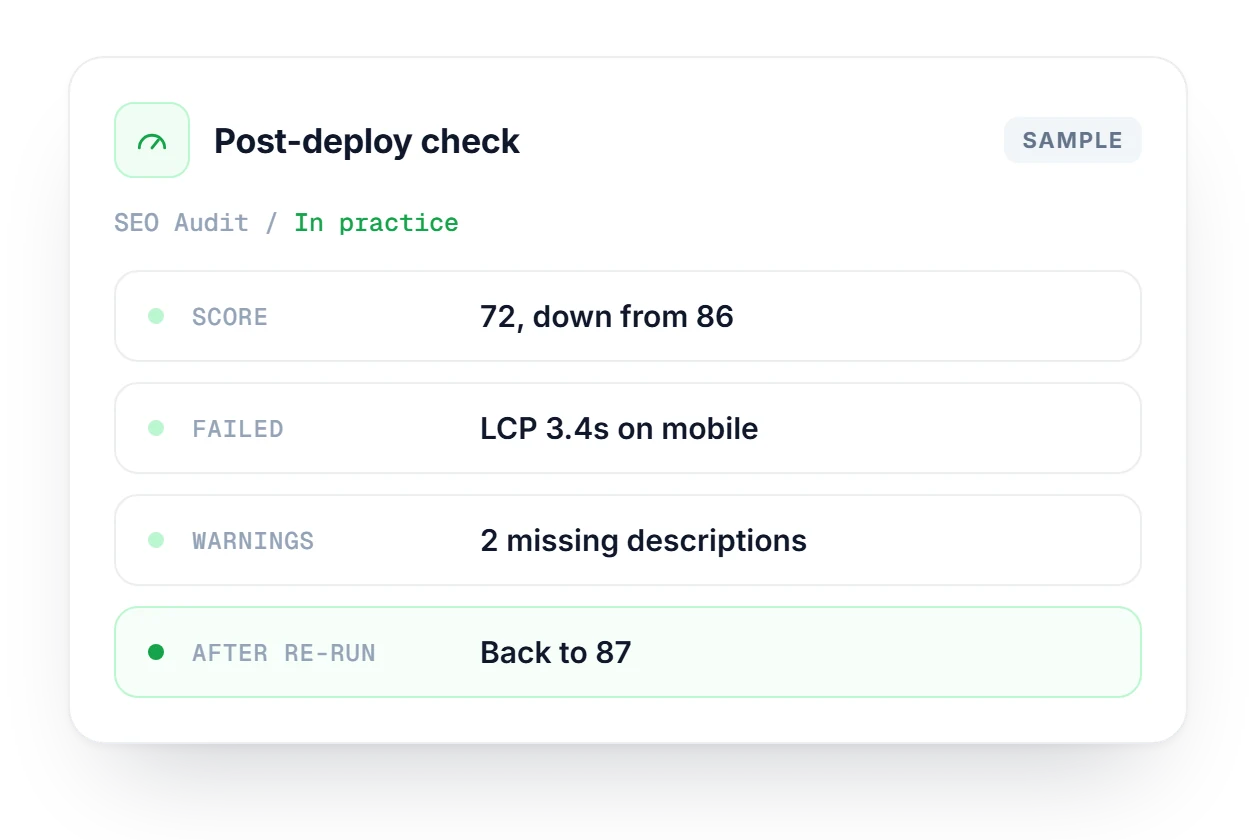
The short answers on coverage, speed and what you get back.
See which plans include extended history and more audits per month.
Compare plans →It covers 14+ areas: PageSpeed, Core Web Vitals, mobile usability, broken links, schema, sitemap, security headers, hreflang, redirects and E-E-A-T signals. Everything lands in one report, with a score for each area and a Pass, Warn or Fail on every check.
Most sites finish in under a minute. Heavy pages or a slow server can stretch that a little. You can watch progress while it runs, and the finished report is saved to your account so you can come back to it.
Yes. Every failed or warning check comes with an AI-written explanation of the problem and the steps to fix it. For titles and meta descriptions that are missing or the wrong length, you also get suggested rewrites.
It looks for the trust signals behind Google's Experience, Expertise, Authoritativeness and Trustworthiness guidance: author information, an About page, a privacy policy, contact details, HTTPS and testimonials. Anything missing shows up as a warning with a suggested fix.
Any URL you're allowed to crawl, yes. Staging sites behind a login usually need a different setup, because the crawler can't get past authentication. If that's your situation, contact support about enterprise crawl options.
Yes, on plans that include extended data history. Those keep every run and show score trends, so you can check whether a fix actually moved the number or just made the report look different.
The free plan includes 3 audits per month. Paste a URL and you get a score, a list of failed checks and the fix for each one.