Triggers built for AI search
New Mentions, Position Improve, New Platform and Mention Increase. They track changes inside AI answers. Uptime pings would miss all four.
After every tracking run, Alerts check what ChatGPT, Claude, Gemini and Perplexity said about you. A new mention, a better position or a new platform gets sent to your email or Discord.

 2m
2m 1h
1h

Sample alerts feed for illustration
Alerts cover every answer engine you track
ChatGPT
Claude
Gemini
Perplexity
If you check visibility by hand, you find the new citation or the lost position days after it happened. Alerts compare each tracking run with the last one and tell you what moved.
New Mentions, Position Improve, New Platform and Mention Increase. They track changes inside AI answers. Uptime pings would miss all four.
Put email on a digest if you like a quiet inbox. Discord webhooks still post the moment a trigger fires, so urgent changes never sit in a queue.
Set up the same alert for all your brands at once. Combined batch then sends the whole portfolio as one email per recipient.
Choose triggers per brand and keyword. The alert engine checks each one against the previous tracking run and sends you the before and after.
Fires when an AI engine names your brand for a tracked keyword where it didn't before. Often it's the first sign a new page is getting picked up.
mentioned: false → trueChatGPT · yourbrandDiscordSampleFires when your brand moves up an AI answer's list of recommendations. Being named first or second beats being named fifth by a wide margin.
position: previous > currentClaude · yourbrandDiscordSampleFires when an engine that has never cited you for a keyword starts to. It tells you which engines react to your content changes.
platforms += perplexityPerplexity · yourbrandChatGPTClaudePerplexityGeminiFires when the mention count for a keyword goes up between runs. Several of these in a row means your visibility is building.
mentions: previous < currentGemini · brand-twoDiscordSampleSet how email arrives for each alert. Discord webhooks stay immediate no matter what you pick.
A notification goes out as soon as a trigger is detected after a tracking run. Use it for launches, your top keywords and anything you'd act on the same day.
Every trigger from the week arrives in one email. You still see everything that changed, just without a ping for each one.
New mention · best crm for startupsnewPosition · crm for small teams#4 → #2New platform · sales pipeline tools1st citeMentions · crm with email sync3 → 7Position · crm pricing#6 → #3Alerts for all your brands are merged into one email per recipient. Agencies and portfolio teams get one summary instead of a pile of messages.
New mention · best crm for startupsnewPosition · crm for small teams#4 → #2Mentions · crm with email sync3 → 7Discord webhooks are never batched.The Active Protocols grid gives each running alert its own card, showing the platforms it watches, its triggers, how it delivers and when it last fired.
Platforms, triggers, delivery icons and the last time each alert fired.
Active Monitors, Total Alerts, AI Surfaces and Brands under watch, pinned to the top of the page.
Choose the brand, the keywords, the engines to watch (ChatGPT, Claude, Gemini, Perplexity) and the trigger type.
Immediate email, Weekly digest, Combined batch or a Discord webhook. Deploy the protocol and it keeps watching around the clock.
Each new tracking run is compared with the last one, and notifications go out on their own. Digest history is kept in Combined Alerts.
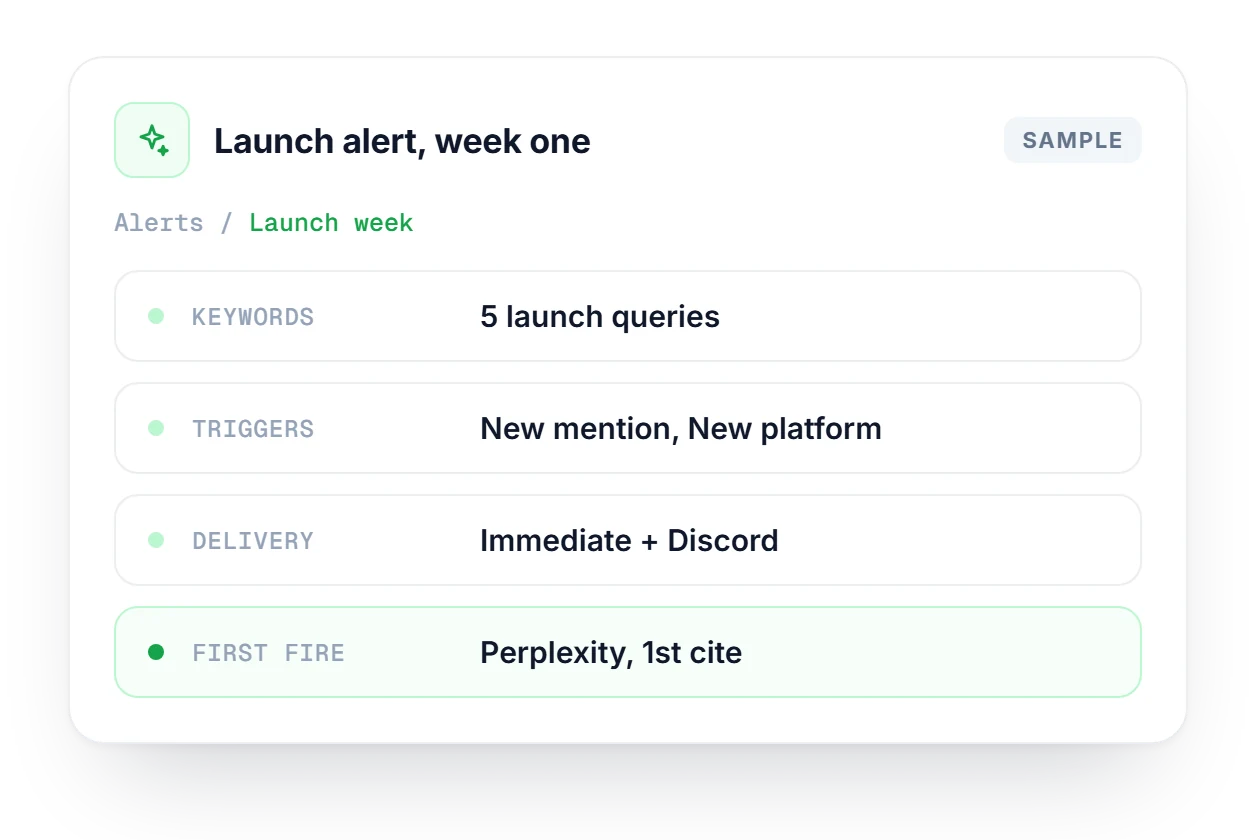
A team launching a new pricing page sets one alert for its five launch keywords across all four engines, with New Mentions and New Platform on. Delivery is Immediate, with a Discord webhook posting to the launch channel, while everything else stays on the weekly digest. The first Perplexity citation shows which engine noticed the page first.
Every digest and combined batch you've been sent, with trigger details and a force-send button for batches still pending.
Explore Combined AlertsThe tracking runs your alerts depend on. See which engines mention your brand for each keyword you care about.
Explore Track KeywordsMeasure your share of voice in AI answers against competitors, so an alert comes with some context.
Explore Brand MonitorHow triggers, delivery modes and Discord webhooks work together.
See which plan includes combined batch and multi-brand alerts.
Compare plans →There are four triggers: New Mentions, Position Improve, New Platform and Mention Increase. If you manage several brands, multi-brand setups add a fifth, Mention Drop, so you also hear about it when visibility falls instead of only when it rises.
An alert can watch ChatGPT, Claude, Gemini and Perplexity. You pick the engines for each alert when you create it, along with the brand, the keywords and the trigger type, so one alert can cover all four or just one.
Immediate sends a notification as soon as a trigger is detected. Weekly digest collects all of the week's triggers into one email. Combined batch merges alerts from all your brands into one email per recipient, which suits agencies.
No. Discord webhooks always post immediately, whatever you chose for email delivery. That makes Discord the channel to use for urgent changes, while email can stay on a weekly digest or combined batch.
Alerts fire when a tracking session finishes, because that is when the alert engine compares results. If you track daily, expect to hear about a change within 24 hours. Less frequent tracking means longer gaps.
Combined batch and the multi-brand digest are available on Starter and every plan above it. Plan limits change from time to time, so check the Pricing page for the current numbers before you set up a large portfolio.
Your first alert is free to set up. Choose a brand, pick the triggers and tell it where to send notifications.