You approve every step
Get title ideas and lock one in. Get an outline and review it. The draft doesn't get written until the direction is right.
Pick a content type and enter your topic. AI Writer suggests titles, then an outline, then writes the full draft. Save it, export it as Markdown or send it to Content Lab for a score.
A CRM is where every lead, deal and follow-up lives. For a team of five, the right one saves hours a week.
Look for pipeline views, email sync and simple reporting
Sample draft for illustration
Six content types, each with its own prompts
Each step builds on the last. You approve the title, then the structure, and only after that does AI Writer write the full draft.
Get title ideas and lock one in. Get an outline and review it. The draft doesn't get written until the direction is right.
For blog posts, pick a project competitor or paste any URL. AI Writer reads how that page is structured and written, then follows the same pattern in your draft.
One click sends the draft to Content Lab, and you get back a Content Score, a gap analysis and fixes to make.
You can edit every stage before moving on, so the draft ends up with the structure you wanted.
Choose a content type tile, then add your topic, target keyword, tone (six options), length and any key points the draft has to cover.
Click Suggest titles and choose the one that fits. Once a title is locked, the outline has a clear angle to work from.
Click Suggest outline and look over the structure. Rename, reorder or cut sections. The draft sticks to whatever you approve.
Click Write full draft and read it through. Then Save, Copy, Export as .md or send it to Content Lab for SEO scoring.
Each tile has its own generation prompts, so a press release doesn't come out sounding like a blog post.
Blog posts get one extra option: competitor style matching. Pick from your project competitors (up to 5) or enter any URL, and the draft follows that page's tone and structure.
For longer pieces that explain a topic start to finish. Put the sections you care about in the brief's key points so they don't get skipped.
Announcements in standard press-release form: a clear headline, the news first and the supporting detail after.
Product copy that opens with what the buyer gets. List the features and details that must appear as key points in the brief.
Questions with short, direct answers. Use it as a standalone FAQ page or as a section you add to an existing page.
Landing page copy: a headline, a supporting line, a call to action and the sections below it.
Save up to 30 drafts in your workspace and come back to any of them later. When one is ready, copy it or export it as Markdown for your CMS.
New, Load saved, Copy and Export (.md) all sit on one screen.
Each saved draft reopens with ?draft={id}.
Paste the .md into Notion, Ghost, WordPress or any editor that accepts Markdown.
 Notion
 WordPress
Ghost
WordPress
Ghost
Pick a content type tile. Add your topic, keyword, tone, length and any key points you want covered.
Click Suggest titles, choose one, then click Suggest outline. Fix the structure before you move on.
Click Write full draft. Read it, then Save, Export or send it to Content Lab for a score.
Your team launches a Starter plan on Thursday, so you open AI Writer, pick the Press release tile and add seats, setup time and price as key points. The same brief then produces a landing page and an FAQ. Content Lab flags a missing definition in the FAQ, you fix it, and all three drafts export as Markdown.
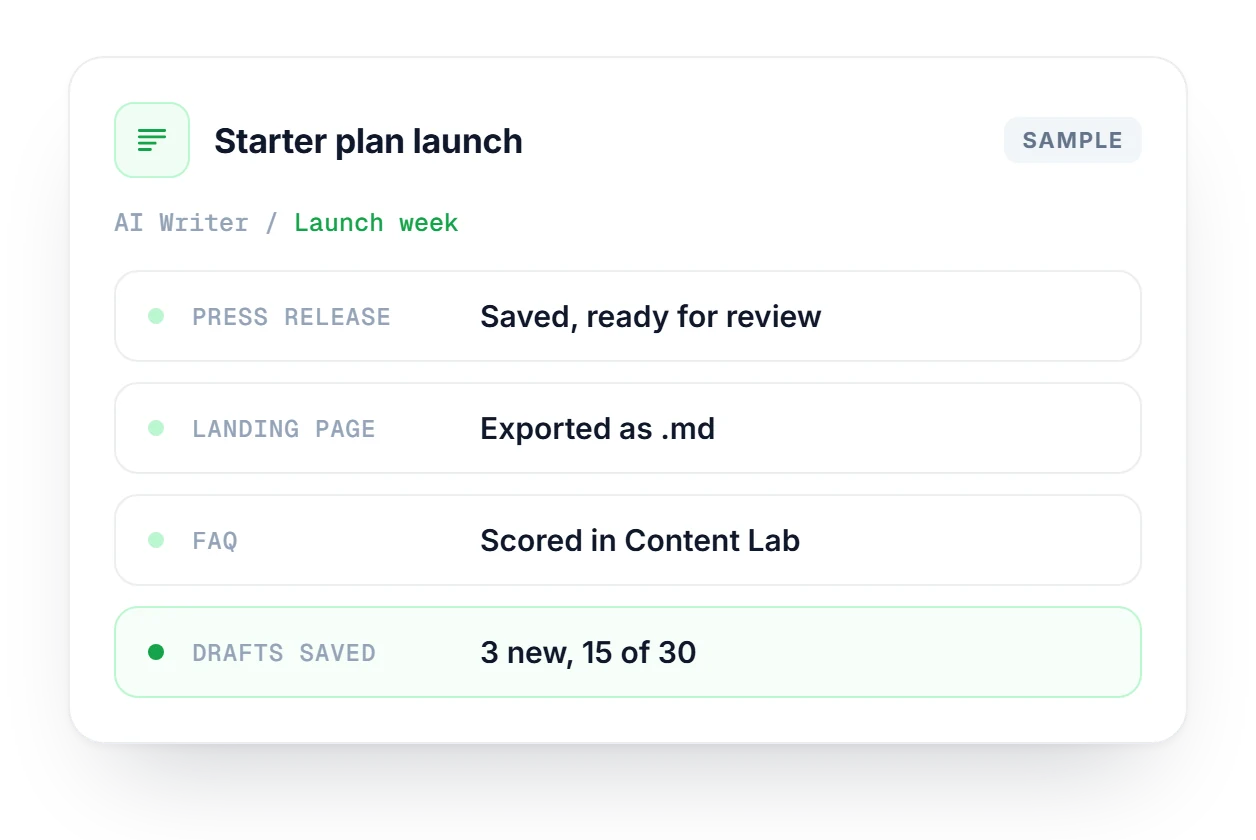
How drafting, saving and handing off to other tools works.
See which plan fits your team and what comes with AI Writer.
Compare plans →Six: Blog, Article, Press release, Product, FAQ and Landing page. Each type has its own generation prompts tuned for that format, so a press release is structured like a press release and a landing page gets a headline, a call to action and sections below it.
For blog posts, you pick one of your project competitors (up to 5) or enter any URL. AI Writer fetches that page, reads its structure and writing style patterns, and then tells the AI to produce a draft that follows the same patterns.
Yes, and you should. After Suggest outline, you can rename, reorder or cut sections before anything gets written. The full draft follows whatever structure you approve, so this is the cheapest point to fix the direction of the piece.
One click sends your draft to Content Lab with source=writer. Content Lab scores it for SEO and AI readiness, then returns a gap analysis with fix recommendations, so you can revise the draft before it goes anywhere near your CMS.
No, you need to click Save. Up to 30 drafts are stored in your workspace, and you can reopen any of them from Load saved drafts or through the ?draft={id} link each saved draft gets.
Yes. Export any draft as a Markdown (.md) file and paste it into Notion, Ghost, WordPress or any other editor that accepts Markdown. If you only need the text, you can also copy the draft directly from the editor.
Start free, no credit card. Pick a content type, approve a title and an outline, and get a full draft you can score in Content Lab.